
Plug
PUBLISHED

Dependencies
- Tizen 2.4 and Higher for Mobile
Content
Related Info
This feature is supported in mobile applications only.
The plug component shows an Evas_Object created by another process. It can be used anywhere in the same way as any other Elementary UI component.
For more information, see the Plug API.
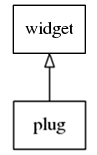
Figure: Plug hierarchy
Adding a Plug Component
To create a plug component, use the elm_plug_add() function:
Evas_Object *plug;
Evas_Object *parent;

plug = elm_plug_add(parent);
Using the Plug
To use the plug:
-
The socket image provides the service to which the plug component is connected. Use the
elm_plug_connect()function, and define as parameters the service name and number set by the socket you want to connect to.To connect to a service named
plug_teston the number 0:elm_plug_connect(plug, "plug_test", 0, EINA_FALSE);
-
Retrieve the
Evas_Objectcorresponding to the remote image with theelm_plug_image_object_get()function:Evas_Object *plug_img = elm_plug_image_object_get(plug);
NoteThe socket to connect to must be started with theelm_win_socket_listen()function in the other process on the remote window object (remote_win):/* Create a remote window in the other process */ Elm_Win *remote_win = elm_win_add(NULL, "Window Socket", ELM_WIN_SOCKET_IMAGE); /* Create a socket named "plug_test" and listen to it */ elm_win_socket_listen(remote_win, "plug_test", 0, EINA_FALSE);
Using the Plug Callbacks
To receive notifications about the plug events, listen for the following signals:
clicked: The image is clicked (press/release).The
event_infocallback parameter isNULL.image,deleted: The server side is deleted.The
event_infocallback parameter isNULL.image,resized: The server side is resized.The
event_infocallback parameter isEvas_Coord_Size(2 integers).
To register and define a callback for the clicked signal:
{
    evas_object_smart_callback_add(plug, "clicked", clicked_cb, data);
}

/* Callback for the "clicked" signal */
/* Called when the plug is clicked */
void
clicked_cb(void *data, Evas_Object *obj, void *event_info)
{
    dlog_print(DLOG_INFO, LOG_TAG, "Plug is clicked\n");
}
Was this document helpful?
We value your feedback. Please let us know what you think.