
WOFF File Format (1.0 and 2.0)
PUBLISHED


Dependencies
- Tizen 2.4 and Higher for Mobile
- Tizen 2.3.1 and Higher for Wearable
- Tizen 3.0 and Higher for TV
Content
Related Info
You can decode and restore font data easily.
The new text features in WOFF File Format 2.0 (in mobile and TV applications) and 1.0 (in wearable applications) include:
- Decoding and restoring font data
WOFF (Web Open Font Format) is a packaging format used to decode and restore font data according to the
@font-facerule to display it identically with the input font. The@font-facerule is a CSS rule that allows linking to fonts and finding a suitable font to display if the original font is not available. You can use WOFF within a Web page.
Using the WOFF File Format
To use the WOFF (Web Open Font Format) file format, which is a W3C standard font packaging format used in Web pages:
- Download and use fonts installed on the Web server by creating
@font-facerules. Within the rules, you can define the following properties:font-familyDefines a name for the font. This property is mandatory.
srcDefines the URL of the font file on the server. This property is mandatory. If the
localattribute is defined, the font resource is not downloaded from the server if it already exists in the local storage.font-stretchDefines the way the font is stretched. This property is optional.
font-styleDefines the font style. This property is optional.
font-weightDefines the font weight. This property is optional.
Define the rules with in a
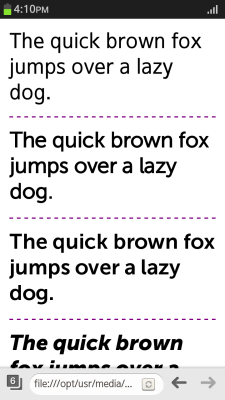
<style>element in the<head>section of a Web page:<head> <style> @font-face { font-family: MuseoSans; src: local('MuseoSans'), url('https://www.tizen.org/sites/all/themes/tizen_theme/webfonts/244CBE_1_0.woff') format('woff'); } @font-face { font-family: MuseoSans; font-weight: bold; src: local('MuseoSans'), url('https://www.tizen.org/sites/all/themes/tizen_theme/webfonts/244CBE_0_0.woff') format('woff'); } @font-face { font-family: MuseoSans; font-weight: 900; src: local('MuseoSans'), url('https://www.tizen.org/sites/all/themes/tizen_theme/webfonts/244CBE_2_0.woff') format('woff'); } p:nth-child(2) {font-family: MuseoSans} p:nth-child(3) {font-family: MuseoSans; font-weight: bold;} p:nth-child(4) {font-family: MuseoSans; font-weight: 900;} </style> </head> - In the
<body>section, create<p>elements containing text in which the font rules are implemented:<body> <p>The quick brown fox jumps over a lazy dog.</p> <p>The quick brown fox jumps over a lazy dog.</p> <p>The quick brown fox jumps over a lazy dog.</p> <p>The quick brown fox jumps over a lazy dog.</p> </body> </html>
Figure: Implementing the @font-face rules (in mobile applications only)
Was this document helpful?
We value your feedback. Please let us know what you think.